



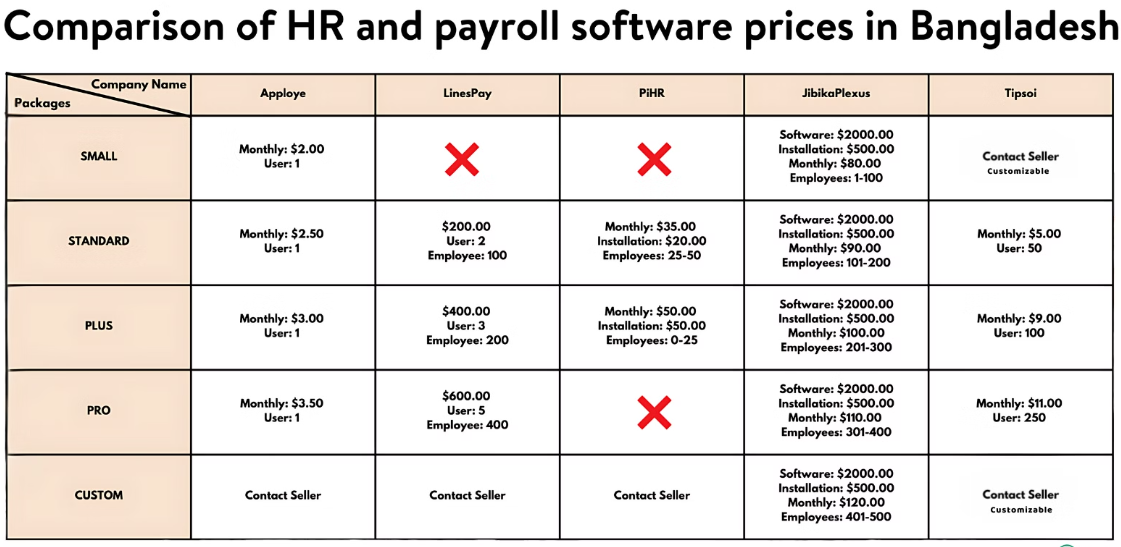
Choosing payroll software is not simply a matter of finding the lowest monthly subscription. A good system should help a small business pay people accurately, maintain organized records, handle required tax tasks, and fit the way owners and employees already work. Before comparing plans, it helps to understand which payroll software providers serve small businesses and which capabilities matter most to your company.
The best choice is usually the platform that delivers reliable payroll with the fewest unnecessary steps and surprises. A cheaper plan may look appealing at first, but it can become less practical when you add workers, operate in more than one location, need tax filing support, or spend too much time fixing avoidable errors.
Why Price Is Not Enough
An advertised starting price rarely tells the full story. Depending on the provider and plan, businesses may pay separately for payroll tax filing, year-end forms, direct deposit, onboarding, time tracking, benefits administration, additional work locations, or advanced support. Review what is included before treating a base fee as the final cost.
For example, a basic plan might work for a company with a few salaried employees in one state. That same plan may require upgrades once the company adds hourly staff, commissions, deductions, retirement contributions, or workers in other jurisdictions. Payroll is a core business process, so a missed deadline or a manual correction can cost more time than a modestly higher subscription fee.
Start With Payroll Needs
Create a short requirements list before watching demos or requesting quotes. Include your current number of employees and contractors, pay schedules, hourly staff, overtime, commissions, bonuses, deductions, paid time off, and preferred payment methods. Also note whether workers need direct deposit, printed checks, pay cards, or employee self-service access.
Consider where people work now and where they may work next year. Remote employees, new locations, and hiring across state lines can change payroll requirements. If you offer health benefits, retirement plans, workers’ compensation, or time-off tracking, decide whether payroll software needs to connect with those systems or manage them directly.

Compare Total Cost, Not Just the Base Fee
Compare each option at today’s headcount and at the headcount you expect in 12 months. Ask for a written quote that includes every feature you consider necessary. This makes it easier to compare providers on equal terms.
Questions to Ask About Costs
- Base subscription: What core payroll functions are included each month?
- Per-person fees: Are employees, contractors, or inactive seasonal workers charged differently?
- Tax services: Are tax calculations, filings, and payments included?
- Year-end forms: Are W-2 and 1099 preparation or delivery charged separately?
- Add-ons: Which features require a higher plan, such as time tracking, HR tools, or benefits support?
- Price changes: How and when can subscription pricing increase?
Check Tax and Compliance Support
Tax support deserves more scrutiny than cosmetic features. Employers are responsible for withholding, depositing, reporting, and correcting payroll taxes as required. The IRS explains that employment taxes include federal income tax withholding, Social Security and Medicare taxes, and federal unemployment tax obligations.
Ask whether the platform calculates taxes only, or also files returns and submits payments. Confirm that it supports the states and localities where your employees work, and ask what happens if a filing is late or incorrect. A provider should clearly explain its responsibilities, your responsibilities, and any available tax-filing guarantees.
Review Ease of Use for Owners and Employees
A payroll system should make a typical payroll run easy to follow: collect hours, review pay changes, approve payroll, and give employees access to their records. Look for clear prompts, understandable reports, and a setup process that does not require payroll expertise for everyday tasks.
Employee self-service can reduce routine administrative work. Check whether workers can view pay statements, retrieve tax forms, update personal details, request time off, and access the system from a mobile device. Also, ask how existing employee information, wage history, and deductions are imported during setup.
Measure Customer Support Before Signing Up
Support quality matters most when payroll must be approved, taxes are due, or an employee’s pay needs immediate correction. Compare available support channels, including phone, chat, email, help centers, and guided onboarding. Ask about support hours, response expectations, and whether staff can address payroll tax and compliance questions.
A dedicated contact may be valuable for some businesses, while others may be comfortable using a general support queue. Either way, test the provider’s responsiveness during the evaluation process. Clear, timely answers can be more valuable than a small monthly discount.
Look at Integrations and Data Flow
Payroll works best when information does not need to be entered repeatedly. Review connections with accounting software, time clocks, scheduling tools, benefits platforms, and expense systems. Ask whether integrations are included in your plan, whether information syncs automatically, and whether data can be exported in a usable format if you switch providers.
Also, examine access controls. Payroll records contain sensitive employee and banking information, so owners should be able to limit permissions, review changes, and maintain an audit trail. If overtime is relevant to your workforce, make sure the platform supports your process for applying overtime pay rules and reviewing employee hours before payroll is approved.
Test the Software Before Switching
- Choose three to five providers that meet your requirements.
- Give each provider the same number of workers, locations, and payroll needs.
- Request a demonstration of a normal payroll run.
- Test overtime, bonuses, deductions, new hires, and terminated employees.
- Review sample reports, employee records, and year-end form workflows.
- Run a test payroll alongside your current process when possible.
- Record setup time, approval time, and unanswered questions.
Avoid Common Buying Mistakes
Common mistakes include choosing only by price, assuming tax filing is included, overlooking state and local requirements, and buying features the business will not use. Businesses also underestimate the effort required to clean up employee data, migrate records, train managers, and change established payroll routines.
Do not ignore future needs. A system that fits five employees may not fit 25 employees working across multiple locations. Ask how the provider handles growth before you sign a contract, rather than waiting until payroll has become more complex.
Final Payroll Software Checklist
- Does the software support your workers, pay schedules, and payment methods?
- Are tax calculations, filings, and payments clearly explained?
- Can it handle every state or locality where employees work?
- Is the total cost clear after required add-ons and per-person fees?
- Can employees securely access the records they need?
- Does it connect with your existing accounting, time, or benefits tools?
- Is practical help available when payroll problems occur?
- Can the platform support planned hiring and business growth?
- Can you export your data if the software no longer fits?
Conclusion
The right payroll software is not necessarily the cheapest option or the one with the longest feature list. It is the system that matches your workflow, supports accurate payroll and tax tasks, reduces manual effort, and remains workable as the business changes. A structured comparison process helps owners make a more confident decision and avoid costly surprises later.
